
Getting Started
Accounts, navigation, settings and sessions — the foundations every REGREP module depends on.
Read the guide →Maintaining and submitting the register of ICT third-party contractual arrangements.
The Digital Operational Resilience Act requires financial entities to maintain a register of information on every contractual arrangement for ICT services with a third party, and to report it to their competent authority.
The register is not a list of suppliers. It is a structured, relational description of which entities in your group hold which contracts, with which providers, for which services, supporting which functions — and how critical each of those functions is. The templates are interlinked by design, and understanding those links is most of understanding the module.
Solutions → Operational Resilience → DORA ROI Reporting Engine.
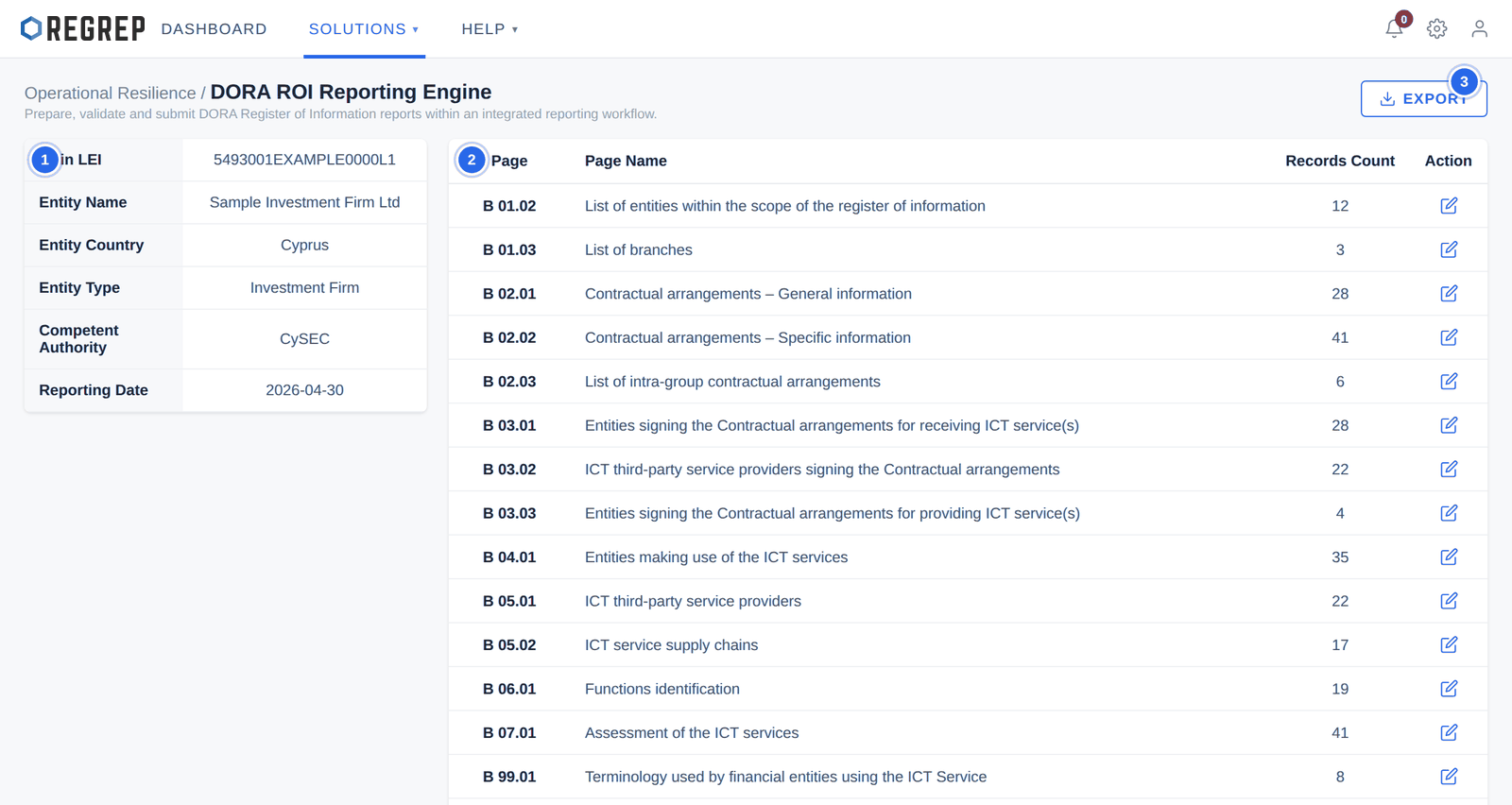
Select the action icon on any row to open that template and add, edit or delete records.
| Page | Name | What it holds |
|---|---|---|
| B 01.02 | List of entities | The entities covered by this register, solo or across the group. |
| B 01.03 | List of branches | Foreign and local operational branches. |
| B 02.01 | Contractual arrangements – General | Master contracts and general agreement terms. The hub the register turns on. |
| B 02.02 | Contractual arrangements – Specific | Detailed terms for specific ICT contracts and services. |
| B 02.03 | Intra-group contractual arrangements | Service level agreements between entities in the group. |
| B 03.01 | Entities signing for receiving ICT services | Financial entities entering agreements to receive services. |
| B 03.02 | ICT TPPs signing ICT contracts | Third-party providers entering the agreements. |
| B 03.03 | Intra-group service providers | Group entities providing ICT services internally. |
| B 04.01 | Entities making use of ICT services | Which internal entities actually use each service. |
| B 05.01 | ICT third-party service providers | The master list of external providers. |
| B 05.02 | ICT service supply chains | Subcontractors and downstream supply chains. |
| B 06.01 | Functions identification | Critical or important functions supported by ICT. |
| B 07.01 | Assessment of ICT services | Risk and dependency assessments. |
| B 99.01 | Terminology used | Internal terminology and service definition mappings. |
| Logs | User Logs | The audit trail of edits to the register. |
| Notifications | Notifications | System alerts and validation warnings. |
The register behaves like a relational database. Records reference each other by key identifiers, and the platform protects those references: a record that something else depends on cannot be deleted until the dependent records are removed first.
This is the single most useful thing to understand before you start editing, because it explains why a deletion you expect to work is refused. There are three structures.
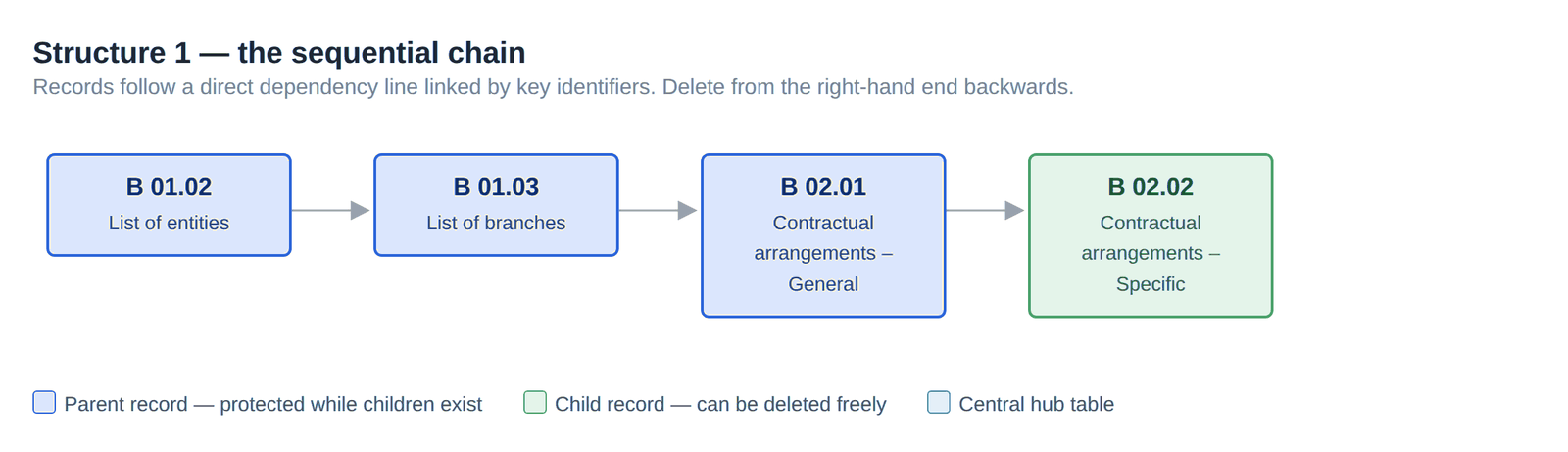
Entities carry branches; branches and entities carry contractual arrangements; general contractual arrangements carry the specific ones. To unwind any part of it, work from the right-hand end back.
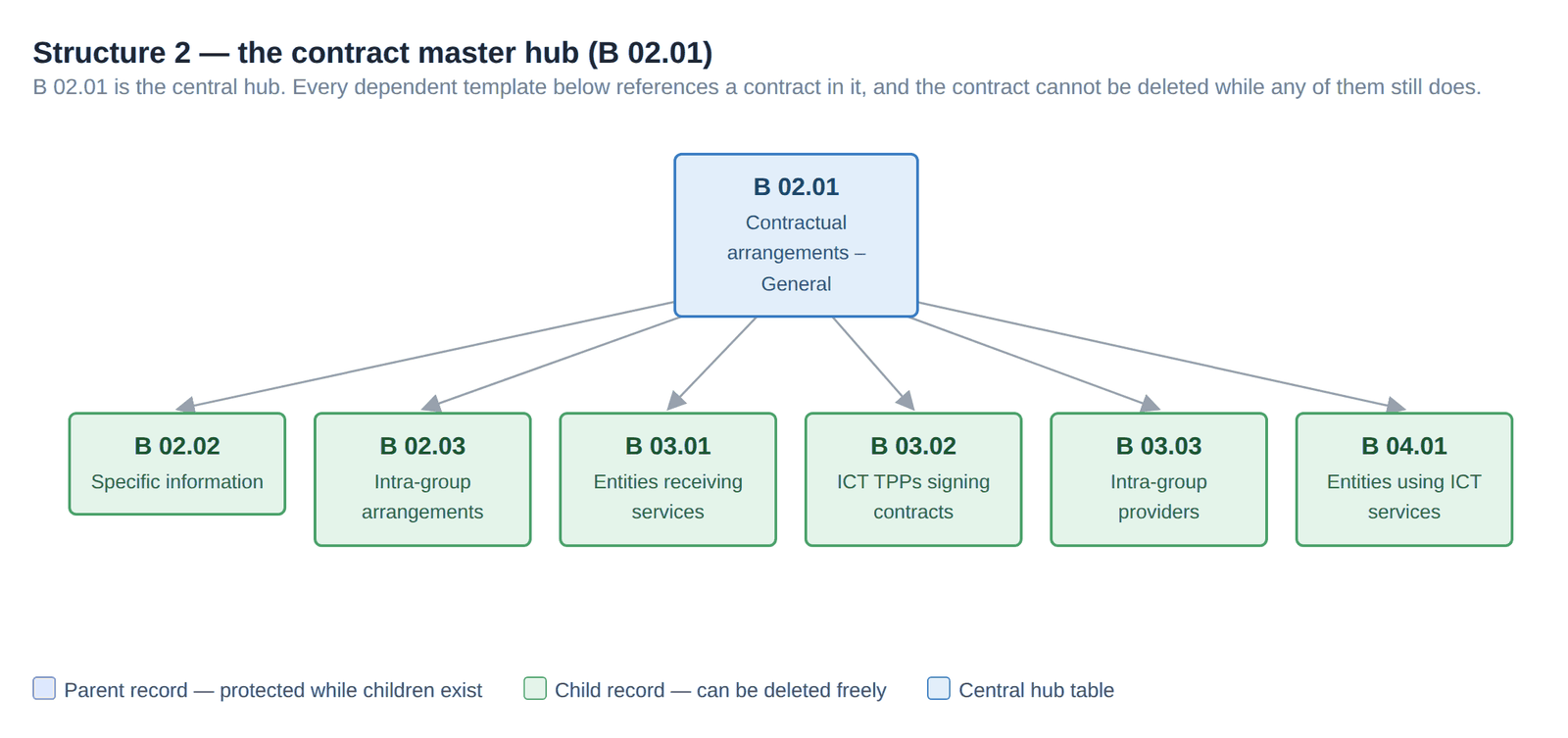
B 02.01 is the table the register turns on. Seven templates reference a contract in it, and a contract cannot be deleted while any of them still does. In practice this means retiring a contract is a sequence: remove the specific terms, the signing entities, the provider links and the usage records, and only then the contract itself.
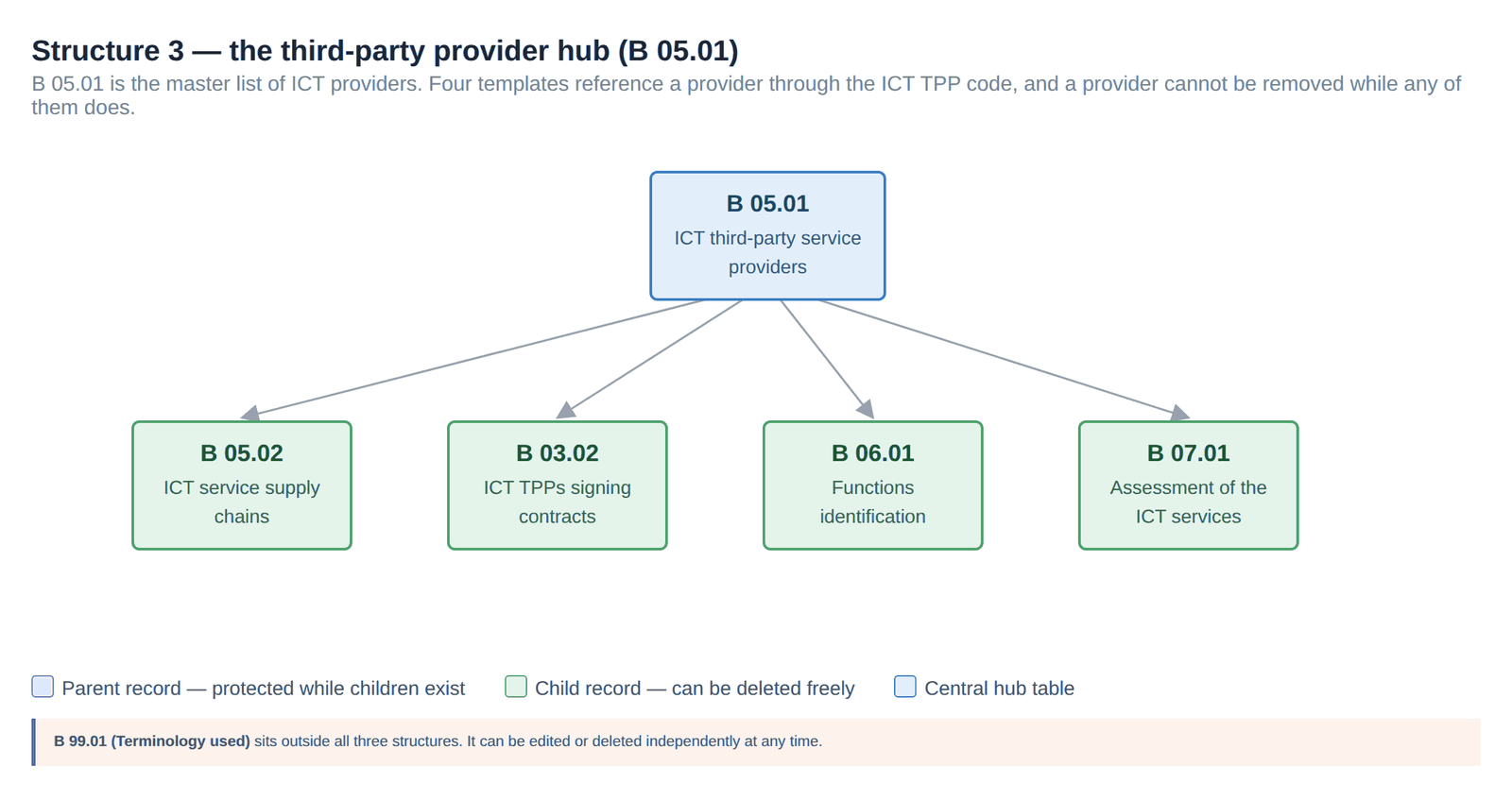
B 05.01 is the master list of providers, linked to four templates through the ICT TPP code. Removing a provider means first removing its supply chain entries, its contract signatures, the functions it supports and its service assessments.
| Rule | What it means in practice |
|---|---|
| The golden rule | A parent record cannot be deleted until every child record referencing it has been removed. Deletion always works inwards from the edges. |
| Multi-parent dependencies | Shared templates such as B 02.02 and B 04.01 are referenced by more than one parent. They stay protected while at least one parent still references them, so removing one parent is not enough. |
| Standalone tables | B 99.01 (Terminology used) sits outside every structure and can be edited or deleted freely at any time. |
Because of the dependencies, building the register works in the opposite direction to dismantling it — from the parents outwards.
B 01.02 and B 01.03 — the entities and branches in scope.
B 05.01 — the ICT third-party providers you contract with.
B 02.01 — the contractual arrangements, referencing the entities and providers already entered.
B 02.02 and B 02.03 — the specific terms and any intra-group arrangements.
B 03.01, B 03.02 and B 03.03 — who signed each contract, on each side.
B 04.01 — which entities use each service.
B 06.01 — the functions the services support, and whether each is critical or important.
B 05.02 — the supply chains behind each provider.
B 07.01 — the risk and dependency assessment of each service.
B 99.01 — terminology, at any point.
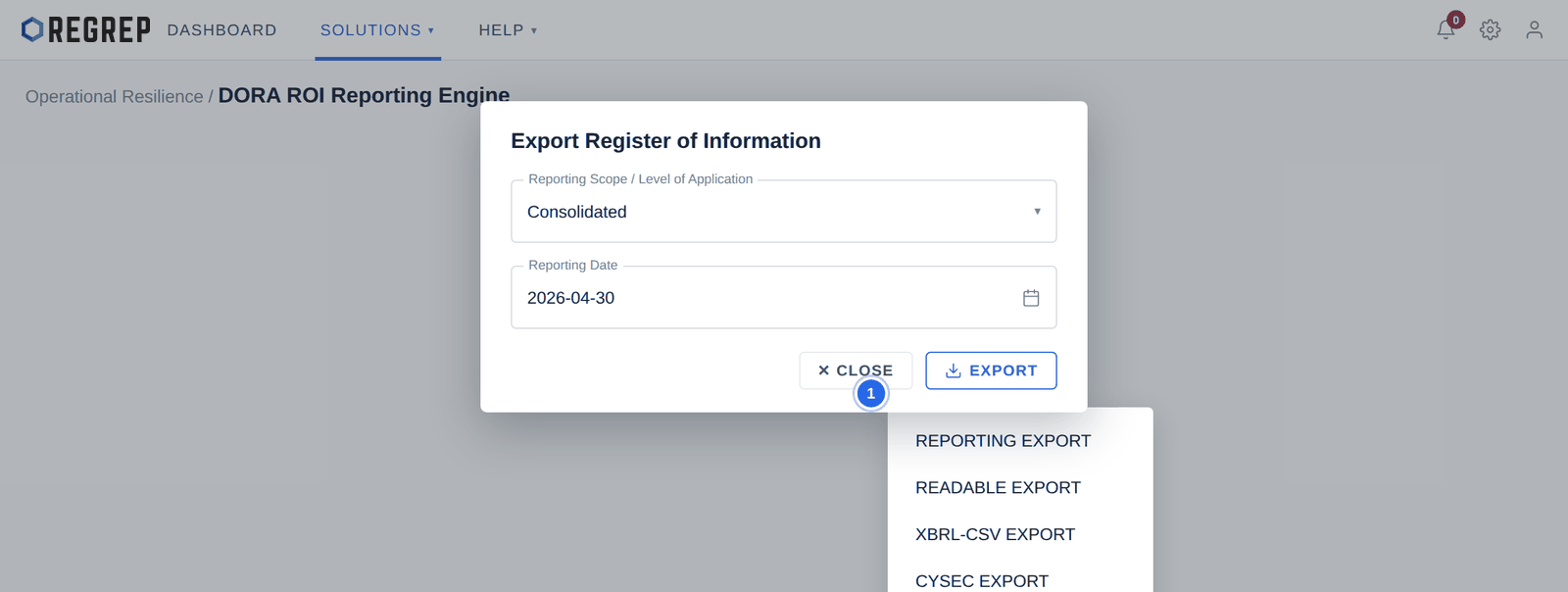
Select EXPORT in the top-right of the main page.
Choose the reporting scope — Solo or Consolidated.
Confirm the reporting date. This is the snapshot date of the register, not today's date.
Select EXPORT and choose a format.
| Format | Use it for |
|---|---|
| REPORTING EXPORT | The standard regulatory reporting package. |
| READABLE EXPORT | A human-readable version for internal review, board reporting and audit. |
| XBRL-CSV EXPORT | The machine-readable package for regulatory submission. |
| CYSEC EXPORT | The format tailored for submission to the Cyprus Securities and Exchange Commission. |
The register is a live record, not an annual exercise. DORA expects it to reflect the firm's actual arrangements, which means it changes whenever the arrangements do.
| When | What to update |
|---|---|
| A new ICT contract is signed | B 05.01 if the provider is new, then B 02.01, the signing templates, B 04.01 and B 06.01. |
| A contract is renewed or amended | B 02.01 and B 02.02. |
| A contract ends | Work inwards: remove the dependent records first, then the contract. |
| A provider changes subcontractors | B 05.02. |
| A function changes criticality | B 06.01, and revisit B 07.01 for the services supporting it. |
| Before each reporting date | Review the whole register, then export. |
The Logs page records every edit, giving you the audit trail of who changed what and when.
| Symptom | Likely cause and fix |
|---|---|
| A record will not delete | Another record still references it. Identify the dependent record using the structures in section 3 and remove that first. |
| A record still will not delete after removing one parent | It is a shared child with more than one parent. Every referencing parent must be dealt with. |
| Entity details in the panel are wrong | They come from Settings → Corporate Information. Correct them there. |
| The export is rejected by the authority | Check the reporting scope, the reporting date and the LEI. Then check for templates with a zero record count that should not be empty. |
| A template shows fewer records than expected | Records were probably entered against the wrong parent. Open the template and check the linking identifiers. |
Document control
| Version | Date | Change |
|---|---|---|
| 2.0 | January 2026 | Rewritten to start at the module. Navigation moves to the Getting Started guide. The three relational structure diagrams — missing from the previous version, which showed headings with no illustration — are now drawn in full. Adds a build order derived from the dependencies, a maintenance schedule, export guidance and troubleshooting. Screenshots refreshed using fictional firm data. |
| 1.0 | — | Original DORA manual. Relational structure diagrams were referenced but not included. |
REGREP is an independent software provider. This manual describes how to operate the platform and is not legal, tax or regulatory advice. Confirm scope, thresholds and submission dates with your competent authority before you file.
The rest of the documentation set.
Accounts, navigation, settings and sessions — the foundations every REGREP module depends on.
Read the guide →Calculating own funds, fixed overheads, K-Factors and concentration risk, and producing regulatory submissions.
Read the guide →Assessing the harms your firm can cause, and the capital and liquidity you hold against them.
Read the guide →Producing the public disclosure of your capital position from the Pillar 1 and Pillar 2 work already done.
Read the guide →