
Getting Started
Accounts, navigation, settings and sessions — the foundations every REGREP module depends on.
Read the guide →Assessing the harms your firm can cause, and the capital and liquidity you hold against them.
Pillar 1 answers a standardised question: what does the regulation say this firm must hold? Pillar 2 answers a harder one: what could actually go wrong here, and is the firm holding enough against it?
The ICARA — Internal Capital and Risk Assessment — is the firm's own view. REGREP models four risk categories against your own parameters, compares the result with the Pillar 1 requirement, and shows where the internal assessment exceeds the standardised one. That difference is the additional capital for harms the K-Factors do not capture.
| Risk | What the module models |
|---|---|
| Market risk | Value at Risk across the banking book and trading book, at a confidence level you set. |
| Counterparty risk | Expected loss and Credit VaR by currency and counterparty, using your own correlation and loss-given-default assumptions. |
| Operational risk | Scenario-based Operational VaR built from a risk register — likelihood, typical impact and extreme but plausible impact. |
| Liquidity | An internal assessment of the liquidity requirement, compared with the Pillar 1 basic requirement. |
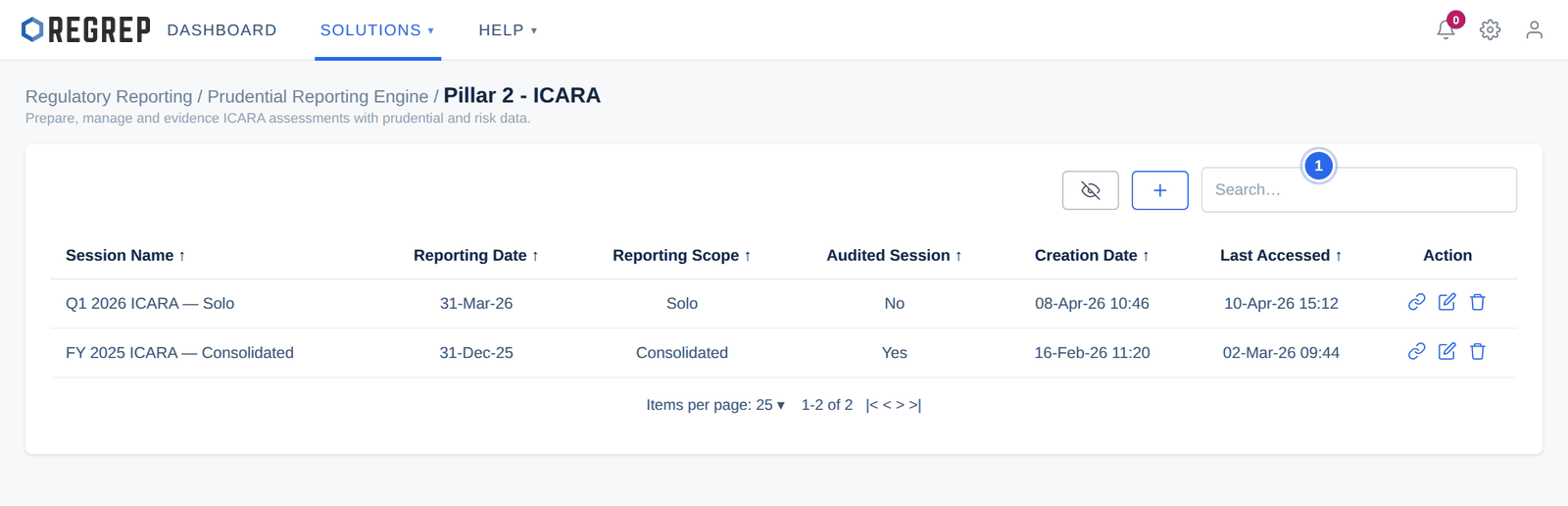
Solutions → Regulatory Reporting → Prudential Reporting Engine → Pillar 2 — ICARA.
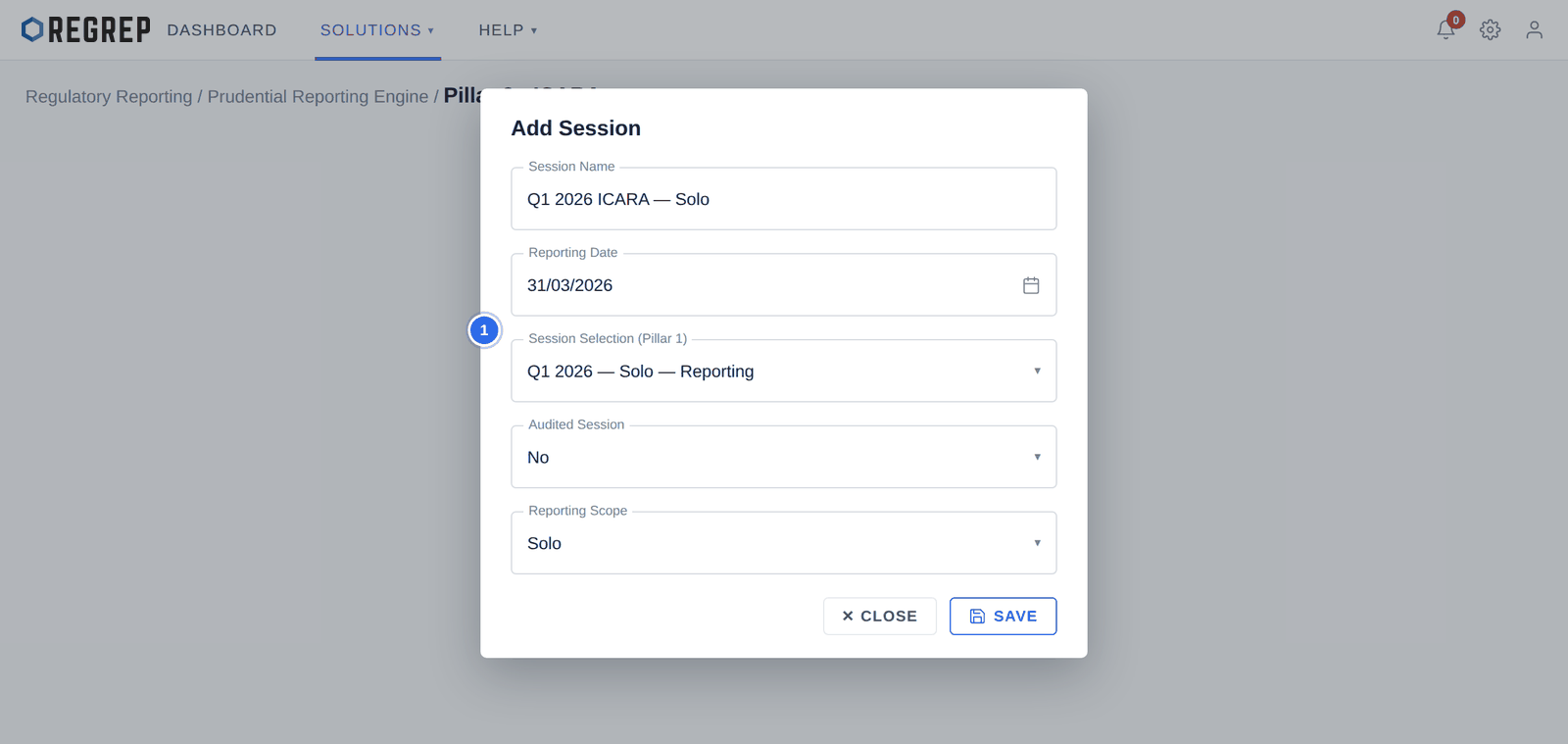
| Field | What to enter |
|---|---|
| Session Name | A descriptive title, for example "Q1 2026 ICARA — Solo". |
| Reporting Date | The effective date of the assessment. Match it to the Pillar 1 session. |
| Session Selection | The Pillar 1 session to draw baseline figures from. Leave blank only for a standalone assessment. |
| Audited Session | Whether the underlying financial figures are audited. |
| Reporting Scope | Solo or Consolidated. |
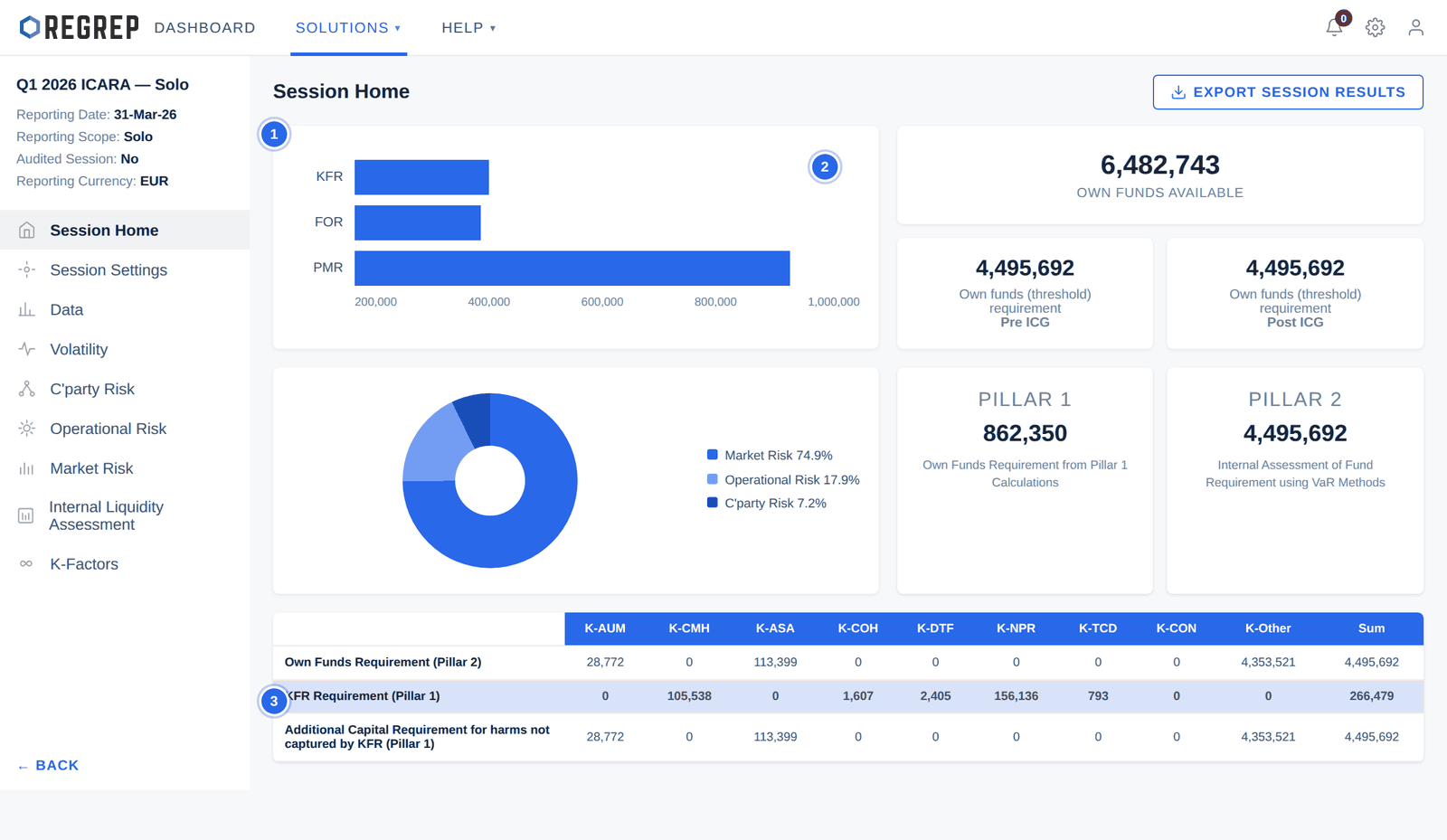
The bar chart at the top left compares the three Pillar 1 requirements. The pie chart below shows which risk category drives the Pillar 2 requirement — in a typical investment firm, market risk and operational risk dominate.
EXPORT SESSION RESULTS in the top-right downloads a complete summary of the assessment.
| Page | Purpose |
|---|---|
| Session Home | The overall position and the Pillar 1 comparison. |
| Session Settings | The statistical parameters every calculation on this session uses. |
| Data | Counterparty risk and market risk exposures, inherited or uploaded. |
| Volatility | Custom historical volatility data, or the defaults from Session Settings. |
| C'party Risk | Exposure distributions, expected loss and Credit VaR. |
| Operational Risk | The scenario register and Operational VaR. |
| Market Risk | Banking book and trading book Value at Risk. |
| Internal Liquidity Assessment | The internal liquidity requirement against available liquidity. |
| K-Factors | The consolidated matrix mapping every assessment back to a K-Factor. |
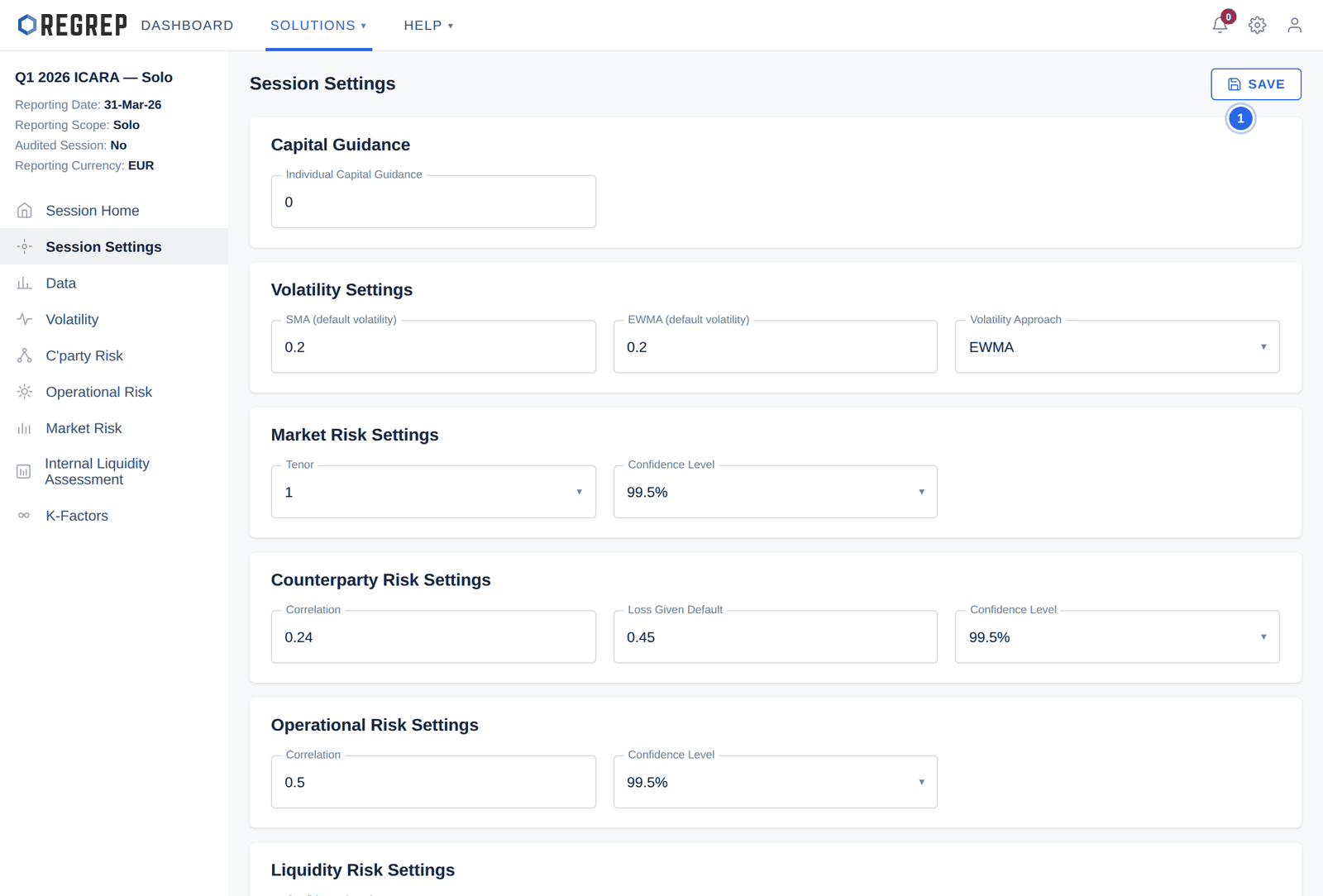
| Setting | What it controls |
|---|---|
| Individual Capital Guidance | A supervisory overlay added to the threshold requirement. Enter the amount your competent authority has set; leave at zero if none applies. |
| Default volatility (SMA / EWMA) | The baseline volatility used when no custom volatility file has been uploaded. |
| Volatility Approach | Which method drives the market risk calculation — simple moving average, or exponentially weighted. |
| Market Risk — Tenor | The holding period in days for the VaR calculation. |
| Market Risk — Confidence Level | The statistical confidence level, typically 99.5%. |
| Counterparty Risk — Correlation | The assumed correlation between counterparty defaults. |
| Counterparty Risk — Loss Given Default | The proportion of an exposure assumed lost on default. |
| Operational Risk — Correlation | The assumed correlation between operational loss scenarios. A lower value produces a smaller correlated sum. |
| Liquidity Risk — Confidence Level | The confidence level for the internal liquidity model. |
The Data page holds the exposures the risk models work from, split between Counterparty Risk (CPR) and Market Risk (MR) tabs.
Where a Pillar 1 session is linked, both are populated automatically from it. This is the normal case and nothing needs uploading.
Where it is not, use the Upload CPR and Upload MR fields and select IMPORT.
The CPR Data tab shows top exposures for the trial balance, on and off balance sheet, and trading counterparties. The MR Data tab shows banking and trading book exposures with their calculated SMA and EWMA volatility.
The Volatility page lets you upload your own historical price or asset volatility data, which then replaces the defaults for the asset classes it covers. Where no file is uploaded, the defaults from Session Settings apply throughout.
Operational risk is the part of the ICARA that is genuinely yours. The platform supplies a starting register; the judgement about what could go wrong in your firm, how likely it is and how bad it could be, is not something software can supply.
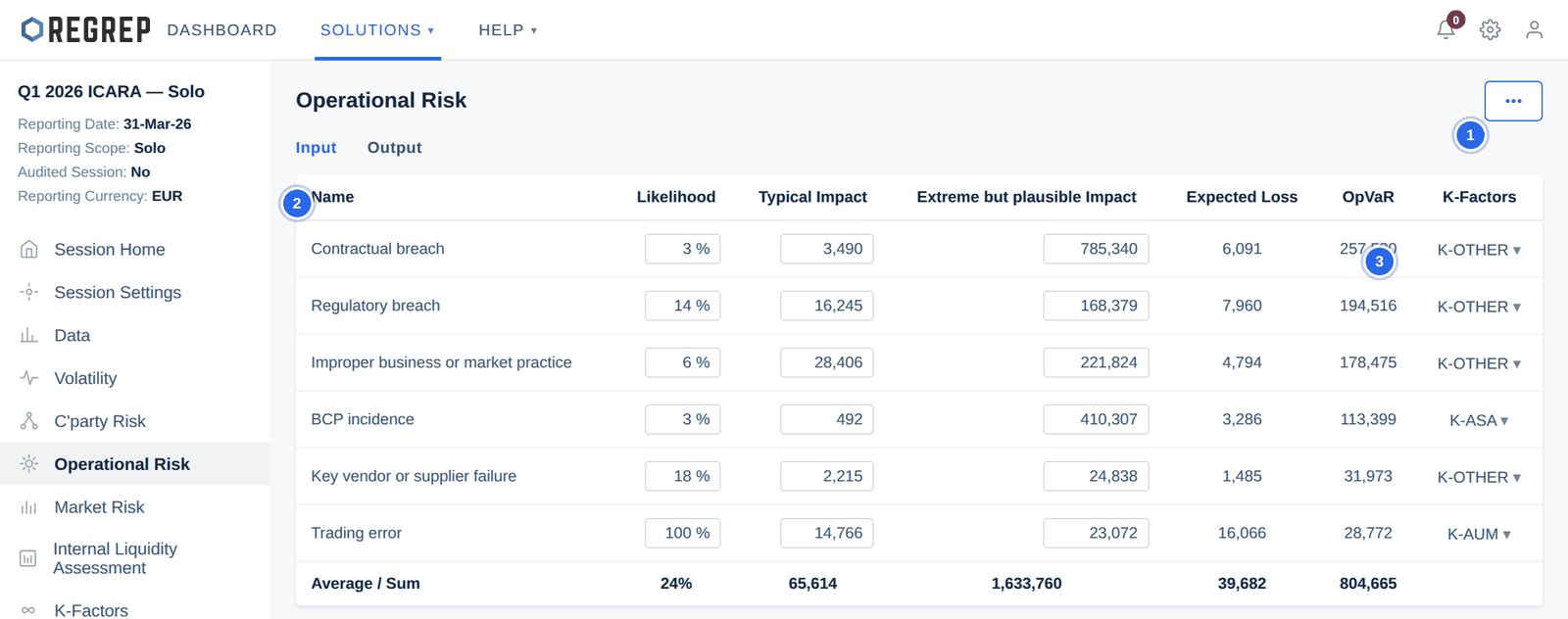
Open the action menu (…) and select DEFAULT RISK BANK to import the standard scenario templates.
Add anything specific to your firm with ADD CUSTOM RISK → + ADD NEW. Each scenario needs a name, a likelihood, a typical impact and an extreme but plausible impact.
Review every imported scenario. A default scenario with default numbers is not an assessment.
Map each scenario to a K-Factor, or to K-Other where no K-Factor captures the harm.
Select CALCULATE OPERATIONAL RISK.
| Column | What it means |
|---|---|
| Likelihood | The probability of the scenario occurring within the assessment period, as a percentage. |
| Typical Impact | The loss in a normal occurrence of this scenario. |
| Extreme but plausible Impact | The loss in a severe but credible occurrence. This drives the tail of the distribution and therefore OpVaR. |
| Expected Loss | Calculated — likelihood applied to impact. |
| OpVaR | Calculated — the Operational Value at Risk contribution of this scenario. |
| K-Factors | The K-Factor this harm maps to. Scenarios mapped to K-Other produce capital additional to the whole K-Factor framework. |
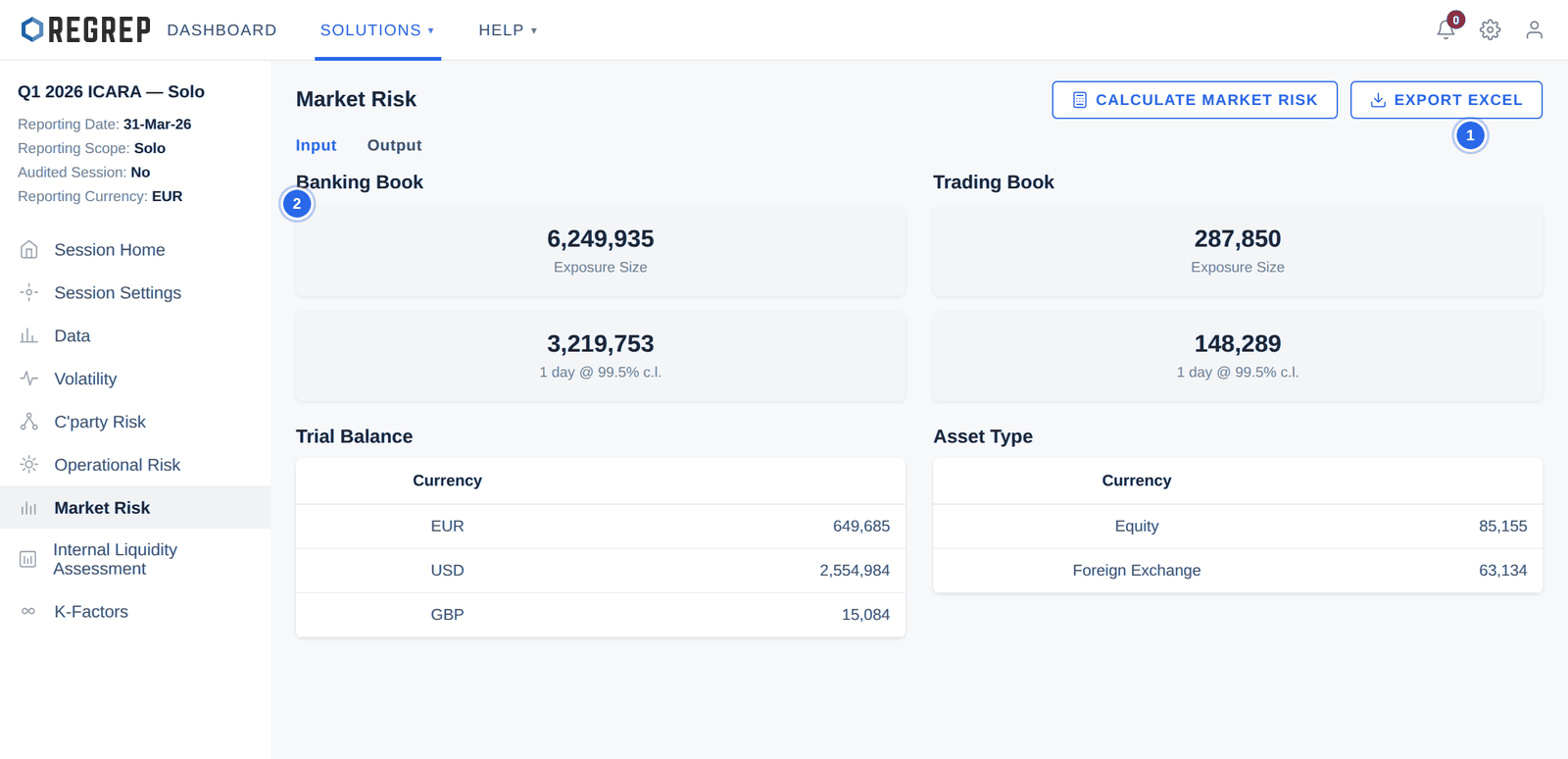
The Input tab summarises exposure size and VaR for the banking book and the trading book, then breaks the exposures down by currency, asset type and foreign exchange position. The Output tab visualises the same data: VaR by asset class, by currency, by commodity, and a heat map of the twenty largest VaR exposures.
The C'party Risk page works the same way. The Input tab groups exposures by currency, showing counterparty counts, converted exposure, expected loss and Credit VaR; the eye icon on any row drills into the individual counterparties behind it. The Output tab summarises average probability of default, expected loss and CVaR, with bar charts by currency.
Select CALCULATE COUNTERPARTY RISK to run the model. Results export to Excel or PDF.
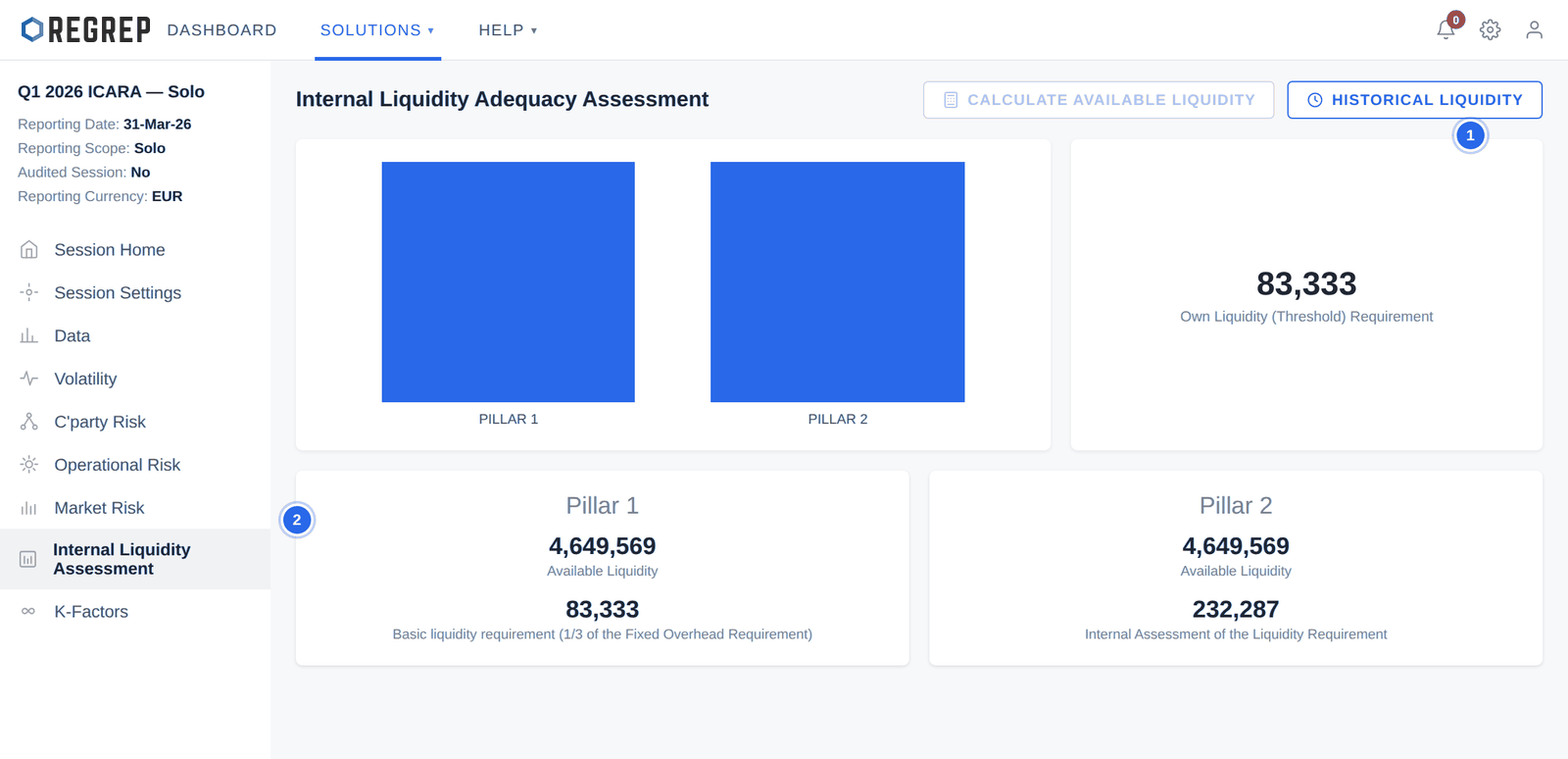
The Pillar 1 basic liquidity requirement is one third of the Fixed Overhead Requirement. The Pillar 2 figure is your own assessment, and will normally be higher — it is meant to reflect what the firm would actually need in stress, not a formula.
Use HISTORICAL LIQUIDITY → + ADD NEW to record liquidity positions by date and amount, building the history a supervisor will expect to see.
The K-Factors page is where the assessment resolves. It maps every operational risk scenario, market risk input and counterparty exposure onto the individual K-Factor categories, and sets the Pillar 2 own funds requirement beside the Pillar 1 KFR.
The bottom row — the additional capital requirement for harms not captured by the K-Factors — is the output of the whole exercise, and the number your ICARA document has to justify.
Complete the Pillar 1 session for the same reporting date.
Create the Pillar 2 session and link that Pillar 1 session.
Set every parameter on Session Settings and save.
Review the Data page, then select CALCULATE OWN FUNDS REQUIREMENT.
Upload custom volatility data if you use it.
Build the operational risk register: import the default bank, add your own scenarios, review every number, map to K-Factors, calculate.
Calculate market risk and counterparty risk.
Record liquidity positions and calculate available liquidity.
Review the K-Factors summary and the additional capital requirement.
Export the session results and file them with your ICARA document.
| Symptom | Likely cause and fix |
|---|---|
| Session Home shows no Pillar 1 comparison | No Pillar 1 session was linked at creation. The link cannot be added afterwards — create a new session. |
| A risk page shows no results | The calculation has not been run. Use the CALCULATE button on that page. |
| Results do not reflect a parameter you changed | Session Settings changes do not recalculate automatically. Save, then re-run each risk module. |
| Operational VaR looks implausibly large | Check the extreme but plausible impacts — a misplaced digit here moves OpVaR more than anything else. Then check the operational risk correlation. |
| Market risk VaR is zero | No exposures were inherited or uploaded. Check the Data page and that the linked Pillar 1 session has an imported trading book. |
| The threshold requirement is unchanged after entering ICG | Save Session Settings, then reopen Session Home. Pre-ICG and post-ICG figures are equal when ICG is zero. |
Document control
| Version | Date | Change |
|---|---|---|
| 2.0 | January 2026 | Rewritten to start at the module. Navigation and Settings move to the Getting Started guide. Documents the consequences of a standalone session, the calculate-then-review dependency on each risk page, the K-Other mapping, and the derivation of the Pillar 1 basic liquidity requirement. Notes that the Session Home chart labels permanent minimum capital as PMR where the rest of the platform uses PMC. Adds a full ICARA cycle and troubleshooting. Screenshots refreshed using fictional firm data. |
| 1.0 | — | Original Pillar 2 manual. |
REGREP is an independent software provider. This manual describes how to operate the platform and is not legal, tax or regulatory advice. Confirm scope, thresholds and submission dates with your competent authority before you file.
The rest of the documentation set.
Accounts, navigation, settings and sessions — the foundations every REGREP module depends on.
Read the guide →Calculating own funds, fixed overheads, K-Factors and concentration risk, and producing regulatory submissions.
Read the guide →Producing the public disclosure of your capital position from the Pillar 1 and Pillar 2 work already done.
Read the guide →Preparing, validating and submitting financial account information under the EU automatic exchange framework.
Read the guide →