
Getting Started
Accounts, navigation, settings and sessions — the foundations every REGREP module depends on.
Read the guide →Producing the public disclosure of your capital position from the Pillar 1 and Pillar 2 work already done.
Pillar 3 is the public leg of the framework. Having calculated its requirement under Pillar 1 and assessed it internally under Pillar 2, the firm discloses its capital position so that clients, counterparties and the market can see it.
This module does almost no calculation of its own. It draws the figures from a linked Pillar 1 session and a linked Pillar 2 session, lays them out in the disclosure templates required under the IFR/IFD framework, and exports a Word document you can publish.
Solutions → Regulatory Reporting → Prudential Reporting Engine → Pillar 3 — Disclosures.
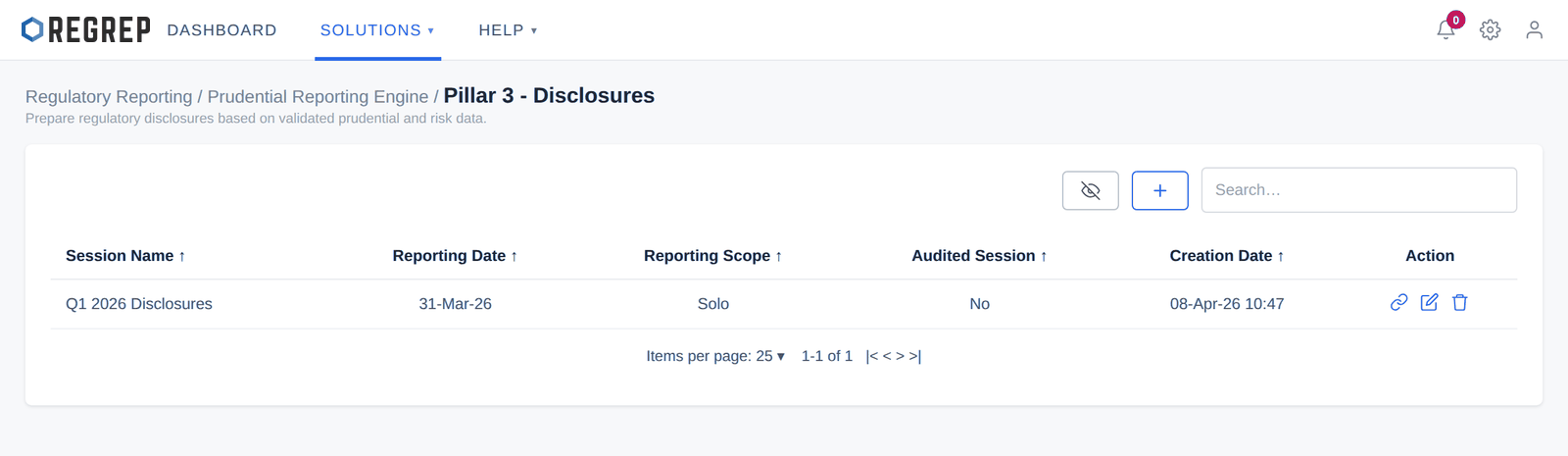
Select + to create a session.
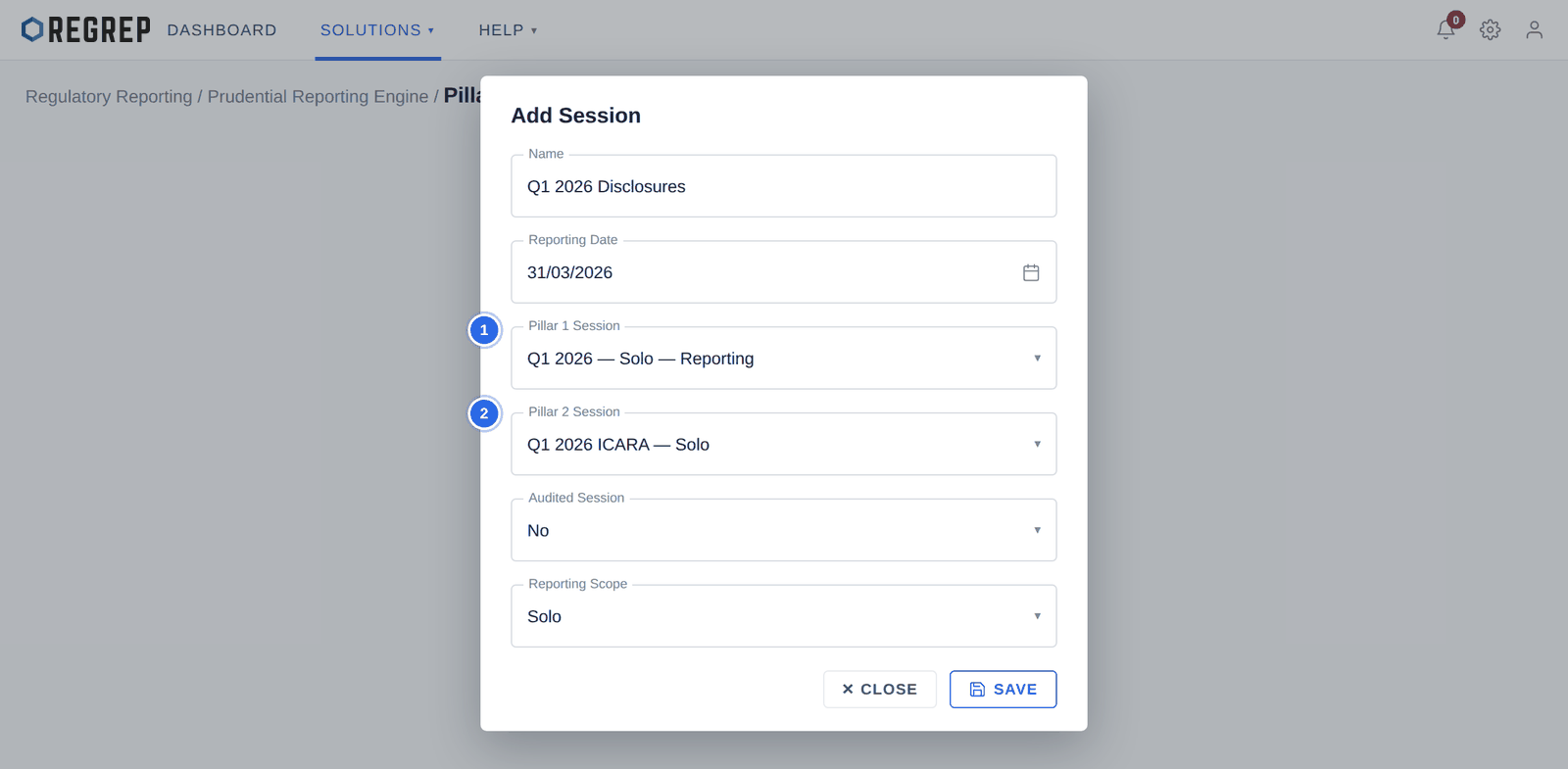
| Field | What to enter |
|---|---|
| Name | A descriptive title, for example "Q1 2026 Disclosures". |
| Reporting Date | The effective date of the disclosure. |
| Pillar 1 Session | The calculation session to draw baseline capital data from. |
| Pillar 2 Session | The ICARA session to draw internal assessment data from. |
| Audited Session | Whether the underlying data is audited. Public disclosures are normally made on audited figures. |
| Reporting Scope | Consolidated or Solo — this must match the scope of the linked sessions. |
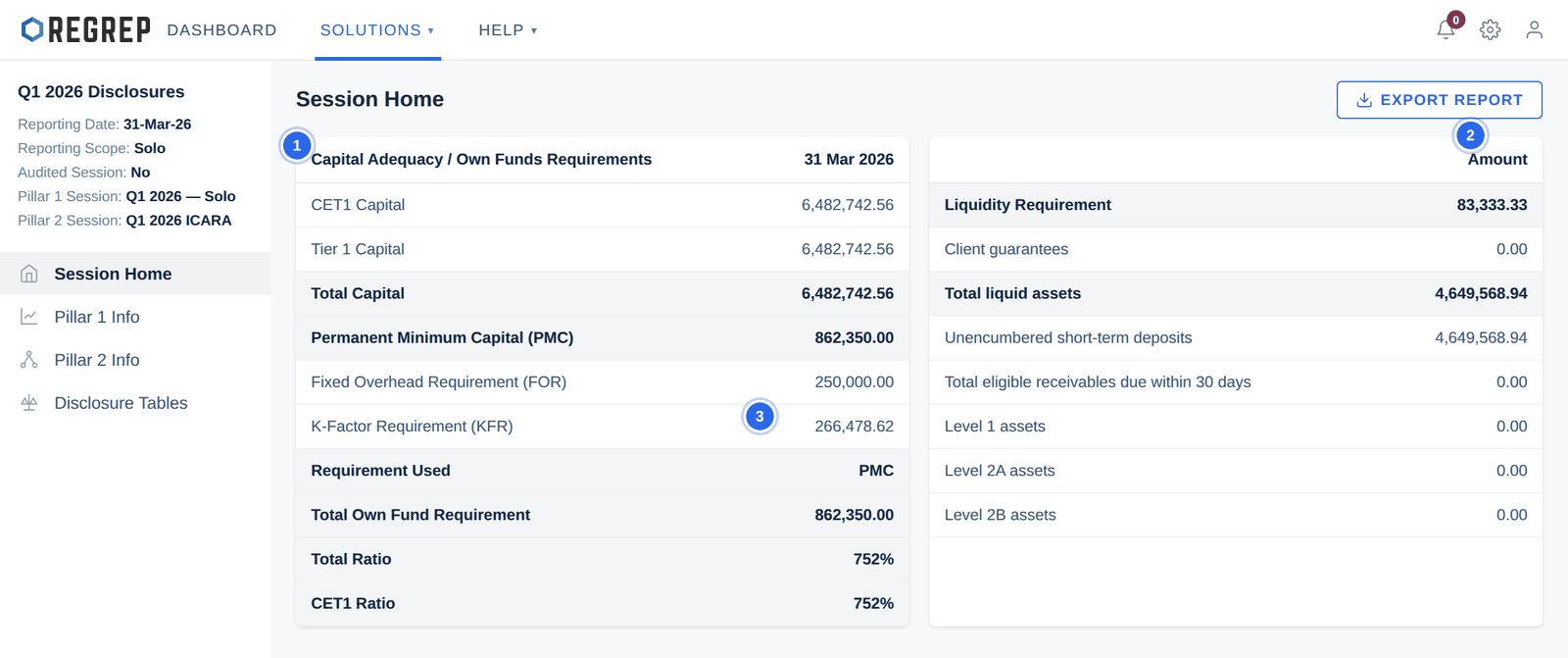
The page brings together everything the disclosure needs:
| Section | Contents |
|---|---|
| Capital Adequacy / Own Funds Requirements | CET1, Tier 1 and total capital against PMC, FOR and KFR, the requirement used, and the resulting ratios. |
| Liquidity Requirement | The liquidity requirement and the breakdown of eligible liquid assets — Level 1, Level 2A and 2B assets, short-term deposits and receivables. |
| Fixed Overhead Requirement | Prior-year expenses, deductions, projected overheads and the percentage variation. |
| Market Risk Requirements (NPR) | Position risk, foreign exchange risk and commodity risk making up net position risk. |
| K-Factor Requirement Summary | Each K-Factor requirement feeding the disclosure. |
These two pages are read-only views of the linked sessions, so you can check a figure without leaving the disclosure.
Pillar 1 Info — capital amounts and coverage ratios, the capital threshold cards, the own funds breakdown including additional valuation adjustments, and the K-Factor requirements grouped by Risk to Client, Risk to Market and Risk to Firm.
Pillar 2 Info — total own funds available, the threshold requirement before and after Individual Capital Guidance, and the comparison of the Pillar 2 requirement against the Pillar 1 KFR across each K-Factor.
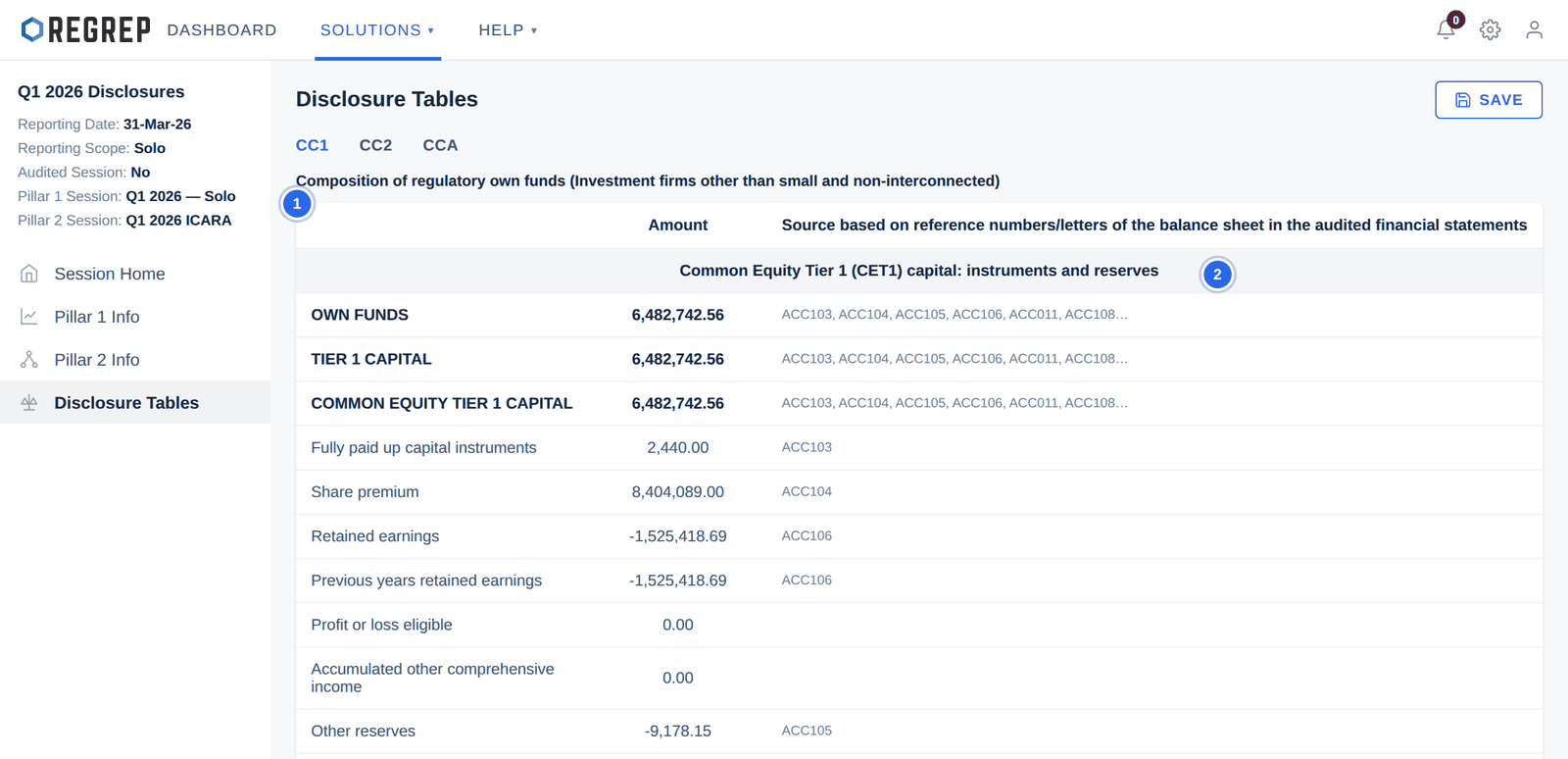
The Disclosure Tables page holds the three templates the IFR/IFD framework requires.
| Template | What it discloses |
|---|---|
| CC1 | Composition of regulatory own funds — CET1, Tier 1 and Tier 2 capital and the deductions applied, each cross-referenced to the audited accounts. |
| CC2 | Reconciliation of regulatory own funds to the balance sheet — mapping published balance sheet lines to disclosure reference codes. |
| CCA | Main features of the capital instruments the firm has issued, qualitative and quantitative. |
The CCA template describes one instrument per column. Where the firm has issued several, select + ADD COLUMN in the top-right to add Column B, C and so on, and complete each.
Confirm the Pillar 1 and Pillar 2 sessions are complete, reviewed and will not change.
Create the disclosure session, linking both and matching the reporting date and scope.
Review Session Home and confirm the requirement used is what you expect.
Check Pillar 1 Info and Pillar 2 Info against the source sessions.
Work through CC1, CC2 and CCA, completing the instrument columns in CCA. Save.
Export the report from Session Home.
Review the Word document, apply your firm's house formatting, and have it approved before publication.
Publish it where your regulator requires, and keep the session as the record of what was disclosed.
| Symptom | Likely cause and fix |
|---|---|
| Figures are blank or zero | One of the linked sessions is incomplete. Open it and confirm the calculations have been run. |
| Figures do not match the Pillar 1 session | The linked session has been edited since. Re-open the disclosure and re-export. |
| Capital and internal assessment figures do not reconcile | The linked sessions probably differ in scope or reporting date. Check both, and rebuild the disclosure if they do. |
| A CCA column is missing from the export | The column was added but not saved. Select SAVE on the Disclosure Tables page, then export again. |
| The requirement used is not what you expected | It is whichever of PMC, FOR and KFR is highest in the linked Pillar 1 session. Check those three figures there. |
Document control
| Version | Date | Change |
|---|---|---|
| 2.0 | January 2026 | Rewritten to start at the module. Navigation and Settings move to the Getting Started guide. Adds the requirement-used indicator, the source reference column, the risk of editing a linked session after export, scope and date matching between linked sessions, a full production workflow and troubleshooting. Screenshots refreshed using fictional firm data. |
| 1.0 | — | Original Pillar 3 manual. |
REGREP is an independent software provider. This manual describes how to operate the platform and is not legal, tax or regulatory advice. Confirm scope, thresholds and submission dates with your competent authority before you file.
The rest of the documentation set.
Accounts, navigation, settings and sessions — the foundations every REGREP module depends on.
Read the guide →Calculating own funds, fixed overheads, K-Factors and concentration risk, and producing regulatory submissions.
Read the guide →Assessing the harms your firm can cause, and the capital and liquidity you hold against them.
Read the guide →Preparing, validating and submitting financial account information under the EU automatic exchange framework.
Read the guide →