
Getting Started
Accounts, navigation, settings and sessions — the foundations every REGREP module depends on.
Read the guide →Checking taxpayer identification numbers against jurisdiction rules, one at a time or in bulk.
A tax identification number that fails validation is one of the most common reasons a DAC2 or CRS submission is rejected. This module checks numbers against the format rules for the jurisdiction that issued them, so you can find and fix problems before they reach a submission.
It works standalone — no session, no prerequisites, no settings to configure. Use it whenever you need an answer about a number.
Solutions → Regulatory Reporting → Tax Reporting Engine → TIN Validation.
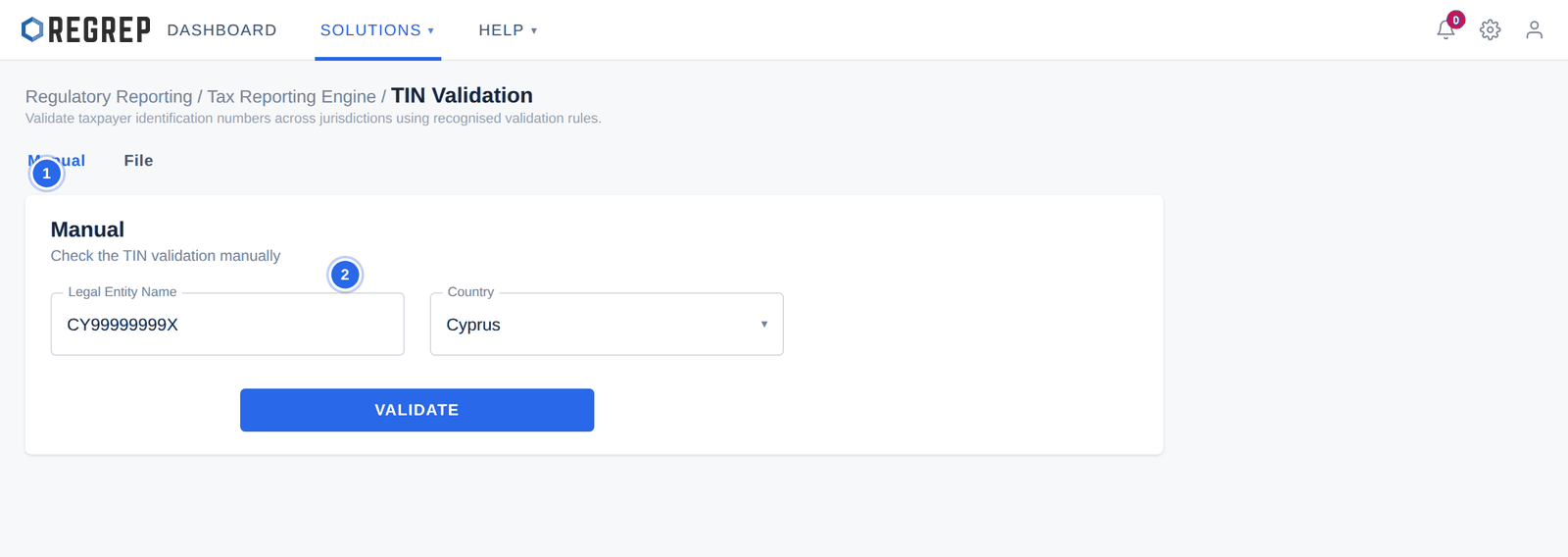
Select the Manual tab.
Enter the tax identification number.
Choose the country whose rules should apply — the jurisdiction that issued the number, not where the account is held.
Select VALIDATE.
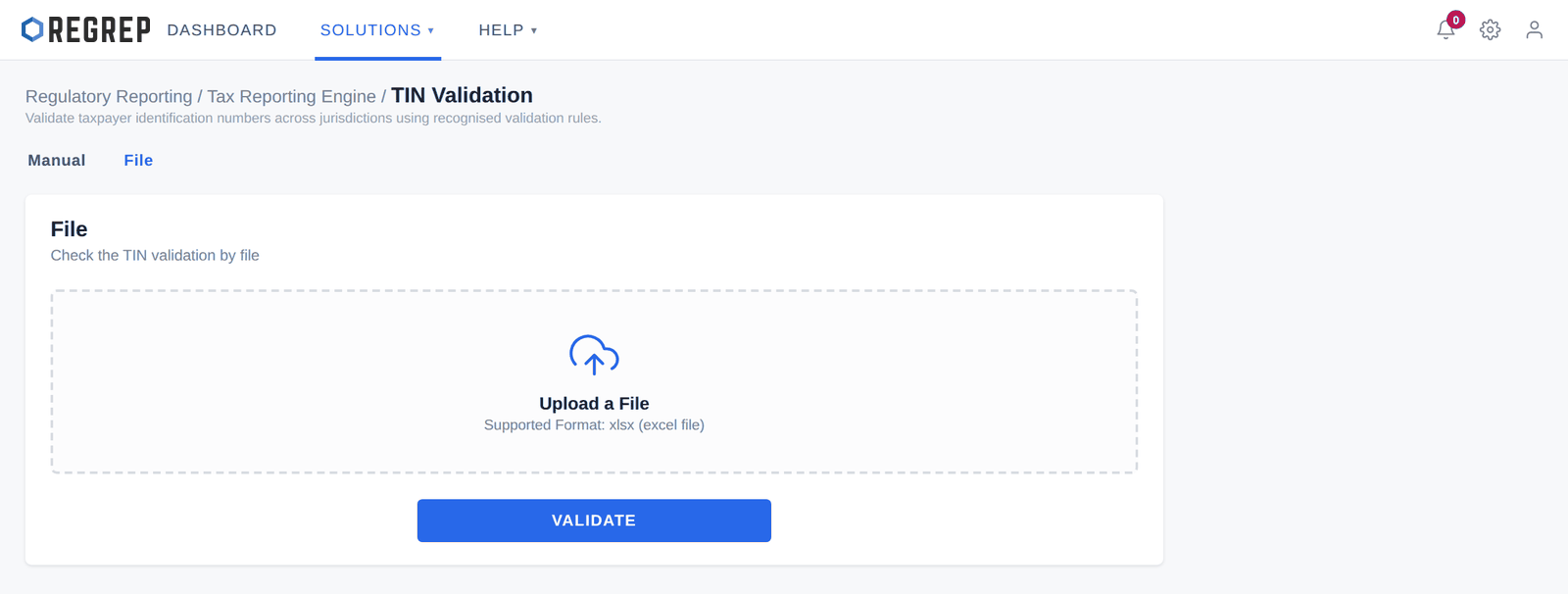
Select the File tab.
Drag your file onto the upload area, or select it to browse. Accepted format: .xlsx.
Select VALIDATE.
Each row is checked against the country given for it, and the results come back per row so you can see which numbers failed and why.
A failure is not always an error in your data. Work through these in order:
| Check | What to look for |
|---|---|
| The country | Is the jurisdiction the one that issued the number? This is the most common cause of a false failure. |
| Formatting | Leading zeros stripped by Excel, spaces, hyphens, or a number stored as a numeric cell rather than text. Re-export the column as text and try again. |
| Whether a TIN exists at all | Some jurisdictions do not issue TINs to individuals, or issue them only in certain circumstances. Follow your tax authority's guidance on the permitted placeholder — never invent a number to make a validation pass. |
| Whether the format changed | Some jurisdictions have changed TIN formats over time. An older number may be genuine but no longer match the current rule; check with the account holder. |
| The source record | If none of the above explains it, the number as held is probably wrong. Go back to the account holder for documentation. |
The DAC2 and CRS modules run their own TIN validation during processing, and report how many of the TINs they identified are valid. This module is for the work you do before you get there.
Run a batch check over your account population before building the reporting extract, so remediation happens while there is still time.
Use the manual check to test a single number a client has just supplied, or to confirm a fix before re-uploading a whole file.
Use it to investigate a specific failure reported by DAC2 or CRS without re-running the entire submission.
Document control
| Version | Date | Change |
|---|---|---|
| 2.0 | January 2026 | Rewritten to start at the module. Navigation moves to the Getting Started guide. Clarifies that the Manual tab field labelled "Legal Entity Name" takes the tax identification number, that the country must be the issuing jurisdiction, and that format validation does not confirm existence or ownership. Adds a failure diagnosis table, guidance on jurisdictions that do not issue TINs, data handling for batch files, and how the module relates to DAC2 and CRS. Screenshots refreshed using fictional data. |
| 1.0 | — | Original TIN Validation manual. |
REGREP is an independent software provider. This manual describes how to operate the platform and is not legal, tax or regulatory advice. Confirm scope, thresholds and submission dates with your competent authority before you file.
The rest of the documentation set.
Accounts, navigation, settings and sessions — the foundations every REGREP module depends on.
Read the guide →Calculating own funds, fixed overheads, K-Factors and concentration risk, and producing regulatory submissions.
Read the guide →Assessing the harms your firm can cause, and the capital and liquidity you hold against them.
Read the guide →Producing the public disclosure of your capital position from the Pillar 1 and Pillar 2 work already done.
Read the guide →